It places the trade.
Then it tells you the truth.
Shogun listens for your TradingView alerts and places the orders on the accounts you choose — with a panic close, a size watchdog and a licence gate that can never block an exit. It runs entirely on your PC. Setup takes about twenty minutes and no code.
One licence, one machine · extra machines available
Shogun is the plumbing, not the strategy.
Most of this industry is vague about that distinction on purpose. We would rather lose the sale than have you buy the wrong thing.
What Shogun is
- ✓An execution platform. It receives your TradingView alerts and places the corresponding orders on your broker accounts.
- ✓A desktop app that runs on your own Windows PC, against your own broker logins.
- ✓A set of guard rails: a watchdog that trims an oversized position, a panic close that flattens every account it manages, and a licence gate that can never block an exit.
- ✓A hosted webhook, so TradingView can reach your PC without you configuring a tunnel, a router or a firewall.
What Shogun is not
- ✗It is not a strategy, and it does not include signals. You bring your own TradingView setup and your own alerts.
- ✗It is not a bot that trades for you while you sleep. If your chart fires nothing, Shogun does nothing — and it has to be running to act at all.
- ✗It is not a broker, a funding company, or a prop firm, and it does not hold your money.
- ✗It is not a promise of profit. Your results are your strategy's results.
If you came here expecting something that finds trades for you, this is not that — and please tell us, because it means we described it badly. We do sell strategies, separately and deliberately so: the Bot Suite →
Four boxes. Only one of them is ours.
The honest diagram makes the product look smaller than a marketing one would. It is also the only way to judge whether it fits what you actually do.
- TradingViewYour alert fires
- Hosted webhookOurs · no tunnel
- ShogunYour own PC
- Your brokerYour own login
The middle box is the only part we run. Shogun itself sits on your machine and signs in with your broker login, which is why we can neither see your accounts nor place a trade on them.
Four steps, in this order.
The order matters: each step needs the one before it. Step three is where people get stuck, so it is the one we made hardest to get wrong. The full setup guide walks all four.
Install and activate
Unpack the folder to a plain local path such as C:\Shogun\ and run
Shogun.exe. Paste the licence key you were sent. That activates the
machine and mints your webhook address.
Run it from a real local folder, not from OneDrive, Dropbox or Google Drive — a sync client can lock the file while it is running.
Connect your broker
Add the connection and switch it on — that opens your broker's own login window for you to sign into. Shogun then reads the account list back from the broker, and you tick the ones it is allowed to trade.
Rithmic (R|Trader Pro web, which is how Bulenox and Apex clear) and TopstepX. Accounts are read from the broker, never invented.
Point your alert at your webhook
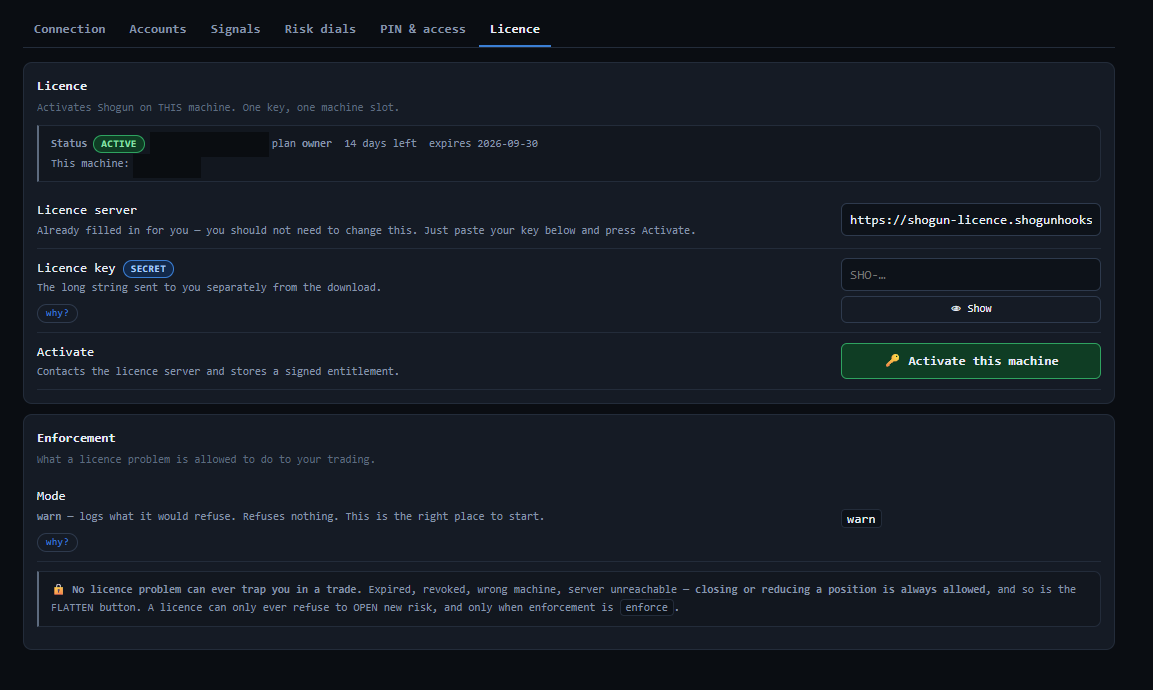
Copy the webhook URL from Setup → Licence into the TradingView alert's
Webhook URL field, and put your alert secret inside the alert message. The
signal name has to match a signal you set up in Shogun.
{
  "name": "NQ ORB long",
  "secret": "your-alert-secret",
  "trade_type": "{{strategy.order.action}}",
  "quantity": "{{strategy.order.contracts}}",
  "sentiment": "{{strategy.market_position}}"
}
There is no tunnel step. The licence server hosts the webhook for you,
so the address is already a public https:// endpoint.
Fire a test and watch it arrive
Trigger the alert once and confirm the delivery counter moves on Shogun's health screen. Until you have seen a test arrive, you are not set up — and a silent miss here is the single most common failure.
Start on a practice or evaluation account. Shogun places real orders with real sizing from the moment it is live.
Step three is where people get stuck. The setup guide walks it with the exact alert body to paste, so you are not guessing at JSON on a live account.
Read the setup guideThe parts that stop a bad day getting worse.
An execution layer's job is not only to place orders. It is to refuse to place the wrong ones.
Size watchdog
Shogun re-checks each position it opened against the size it intended, and trims a genuine excess. It only ever reduces — never past flat, never into a reversal, and never a position it did not open.
Panic close
One control flattens every account Shogun manages, and it does not need your licence to be valid. It reports per account whether the broker confirmed — it will not claim a success it cannot see. Closing does not also pause: that is a separate control.
An exit is never blocked
A lapsed, revoked or unreachable licence can stop a new position opening. It can never stop you closing one — exits, stop moves and trims always go through.
By default you sign in on your broker's own login page, in a window Shogun opens. If you choose to let it sign in for you, the login is encrypted with Windows DPAPI and tied to your Windows account — and Shogun refuses to store it at all rather than keep it in the clear. The control surface listens only on your own machine, and that is forced by the build rather than set in a config file.
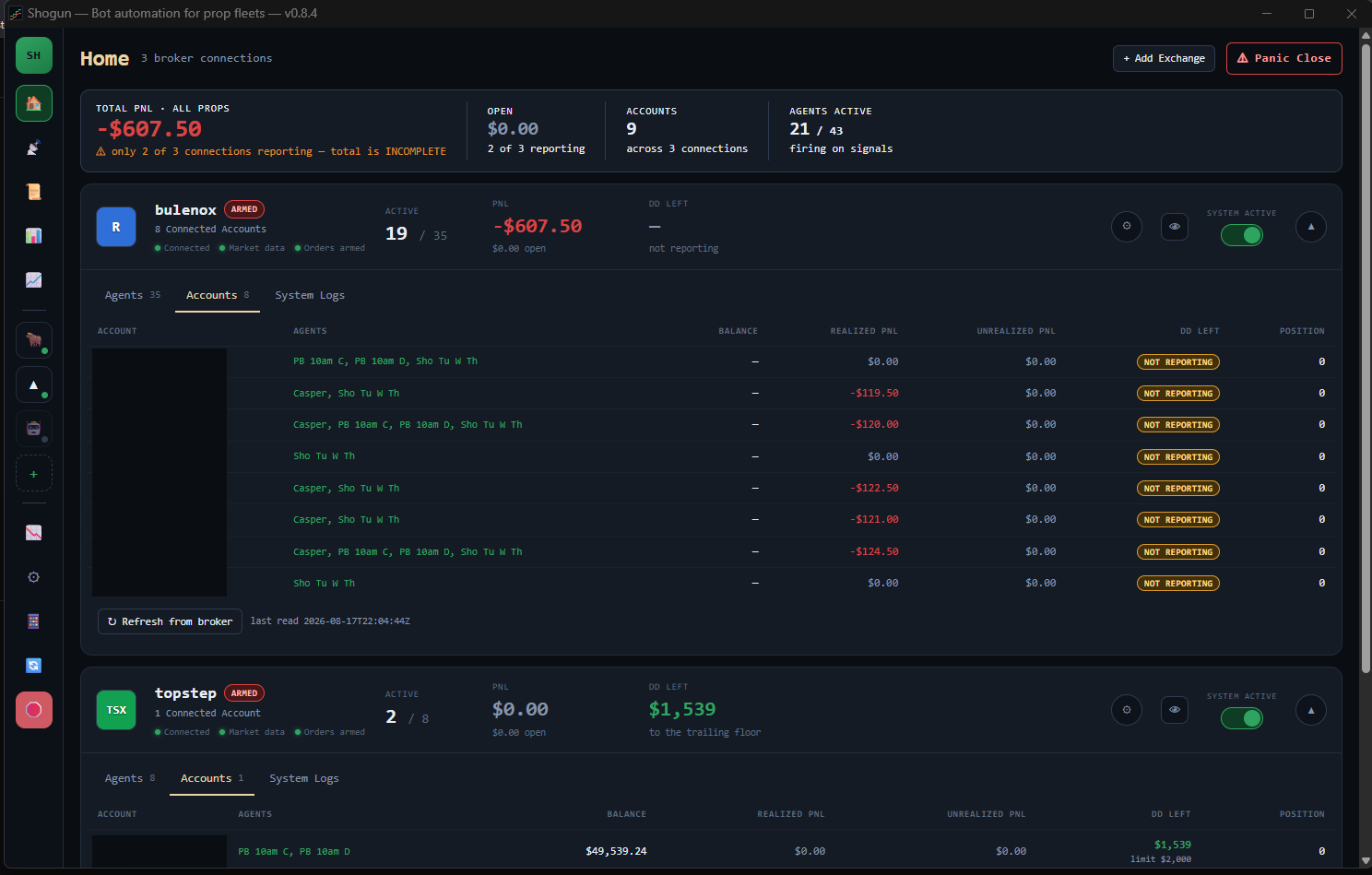
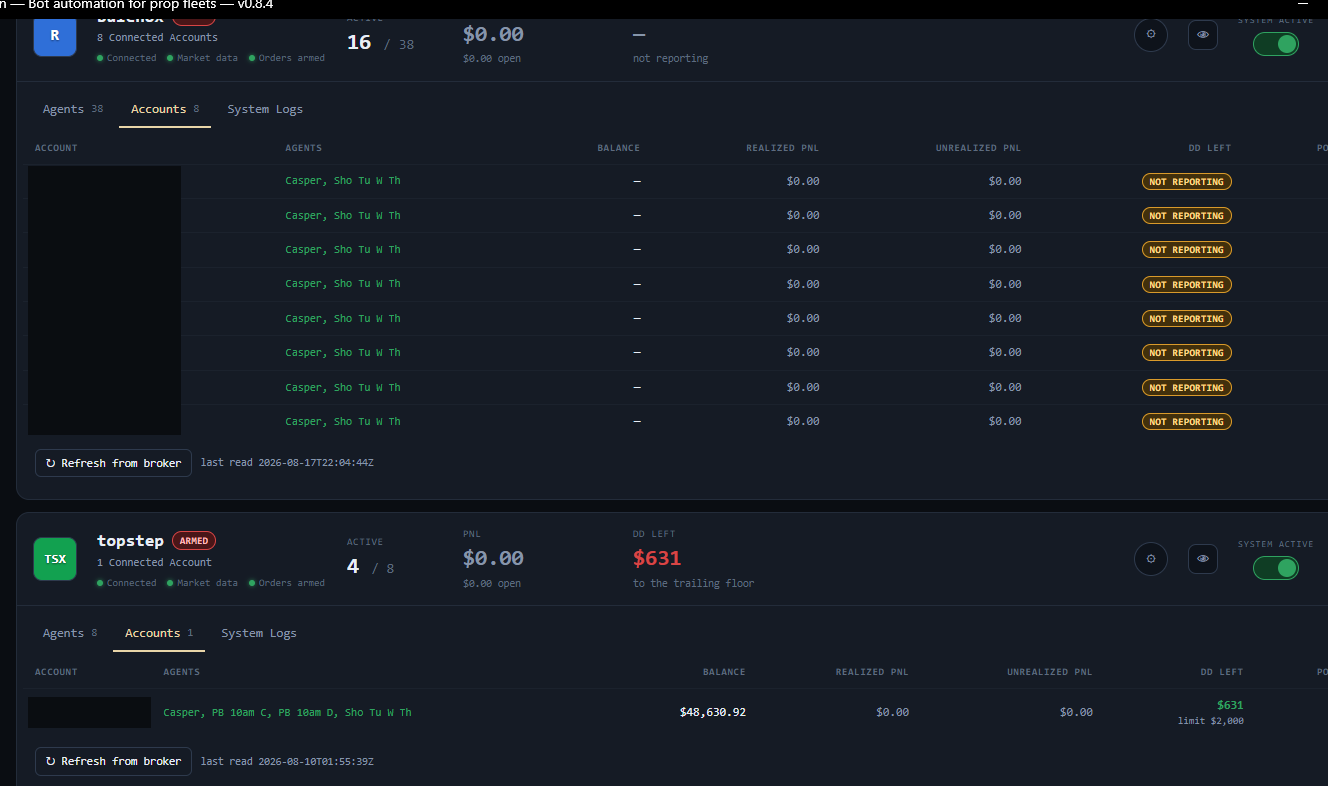
This is what you get, running.
Screenshots of the real thing on real funded accounts, not a mockup. Account numbers are blacked out. Everything else — the profit and loss, the drawdown left, the strategy names — is exactly as it appeared.
There are no testimonials here.
Because we do not have any yet, and we are not going to write some.
Shogun is in private beta. A handful of people run it, and none of them has used it long enough for a quote to mean anything. Every review you have read on a page like this was either solicited, incentivised, or written by whoever built the page — and you have no way to tell which.
When there are real ones, they will be real people who say who they are, and we will say plainly whether they were given anything for it. Until then, the honest things we can show you are on this page already: exactly what this is and is not, what the guard rails do and do not promise, and what happens when it goes wrong.
If you want to judge it before you pay, ask us for a walk-through and run it on a practice account. That tells you more than a stranger's quote ever could.
Shogun executes alerts. The Bot Suite produces them.
Four automated strategies for Nasdaq futures that run on your own TradingView charts. They are a separate product on purpose — each works without the other, and we will never blur which one you are buying.
Session strategies
One fades the sweep that follows the 10:00 New York candle; the other trades the snap-back after price runs out a prior session's high or low.
Opening-range strategies
Both read the first 15 minutes of the New York open — one fades the trapped breakout at the value-area edge, the other trades the range break itself.
Separate, or bundled
Run the bots on their own with any webhook execution service, run Shogun on its own with your own strategies, or take the pair as a bundle.
The bots signal; they do not place orders. They need a paid TradingView plan, and every one ships with a guide that documents how its session close behaves — including when it can fill late. See the Bot Suite →
One licence, one machine.
Monthly, cancel any time from your own account page. Prices include no trial and no setup fee — sales tax is added at checkout where it applies.
The bundle is the two prices added together — it is not a discount yet. It becomes one when the bots have earned it.
One machine. Cancel any time from your account page.
- ✓Activates on one machine — add more for a smaller monthly fee each
- ✓Hosted webhook endpoint included
- ✓Your own signals, your own accounts, your own sizing
- ✗No strategies or signals included
What can go wrong, and where the responsibility sits.
We would rather say this plainly before you buy than have you find it out on a funded account.
This is software, and software fails
Shogun can miss an alert, act on one late, place an order you did not expect, or stop running without telling you. It depends on TradingView, on your internet, on your PC staying awake, on your broker's platform, and on our licence server — and any one of those can fail without warning, including while you are in a position.
A stop is not a guaranteed exit price
Gaps, fast markets, thin liquidity, execution latency and slippage can all make a loss larger than the number you set. The price your strategy expected and the price you get will differ.
Automated orders can breach a prop account in a single trade
Funded and evaluation accounts carry rules that an automated system can violate faster than you can react — a daily loss limit, a trailing drawdown, a maximum position size, or a flat-before-the-close deadline. A breach can end the account regardless of whether you were up or down on the day.
Shogun's guards and the session-close built into the bots are there to assist with that. They do not guarantee compliance, they depend on settings you control and on the platform actually running, and meeting your firm's rules remains yours. Read your firm's rulebook; it is the one that decides.
Where the responsibility sits
You are responsible for every order placed in your account. We do not accept liability for trading losses, for missed or duplicated trades, or for an account being suspended, breached, failed or closed — whether that follows from a defect or error in our software, from a failure of a service it depends on, from a configuration you chose, or from the market itself.
Nobody here sees, directs or manages your account, and no order is placed on your behalf without your own setup. We provide tools; the trading decisions and the consequences are yours.
So start on a practice account
Run it on an evaluation or simulated account until you have watched it behave across a full session and you trust what it does. Only trade with money you can afford to lose entirely — and with futures, you can lose more than you put in.
Before you buy.
Do I get trading strategies with this?
No. Shogun executes the alerts you already have. You bring your own TradingView strategy and your own alerts. Strategies are a separate thing entirely and are not part of this product.
Do I need to set up a tunnel or open a port?
No. The licence server hosts your webhook, so what you paste into TradingView is already a public address. No cloudflared, no Cloudflare account, no router settings, no firewall rules.
Can you see my accounts, or place trades on them?
No. Shogun runs on your PC against your own broker logins, and we have no path to your broker. Sizing decisions, the guards and panic close are all local to your machine, and the control surface only ever listens on your own machine — that is forced by the build, not a setting.
You sign in on your broker's own page by default. If you opt to have Shogun sign in for you, that login is encrypted on your machine with Windows DPAPI and never leaves it.
Windows says the app is unrecognised. Is that a problem?
That warning is expected on a build that is not yet code-signed. Choose More info then Run anyway. You can verify the download against the SHA-256 hash published with your copy if you want to confirm the file is intact — the docs show how.
Which brokers does it work with?
Two platforms today: Rithmic, via the R|Trader Pro web platform — which is how Bulenox and Apex accounts clear — and TopstepX for Topstep.
Tradovate, NinjaTrader and The Futures Desk are listed inside the app but are not wired, and Shogun will refuse to add them rather than show you a connection that can never connect. If your firm clears somewhere else, ask before you buy and we will tell you straight.
What happens if my PC restarts or goes to sleep?
Shogun has to be running to act on an alert, and it does not restart itself. A Windows Update reboot overnight will leave it closed the next morning, and nothing will tell you — your alerts fire, arrive at a machine with nothing listening, and vanish.
The app shows its live status in a sentence on the main screen, so a glance before each session tells you the difference between a dead app and a quiet market. That is the single most common way people lose trades with it, so we would rather you knew now.
Still not sure it is the right thing? Ask before you buy. We would rather lose the sale than have you set this up against an account it cannot trade.
Get Shogun